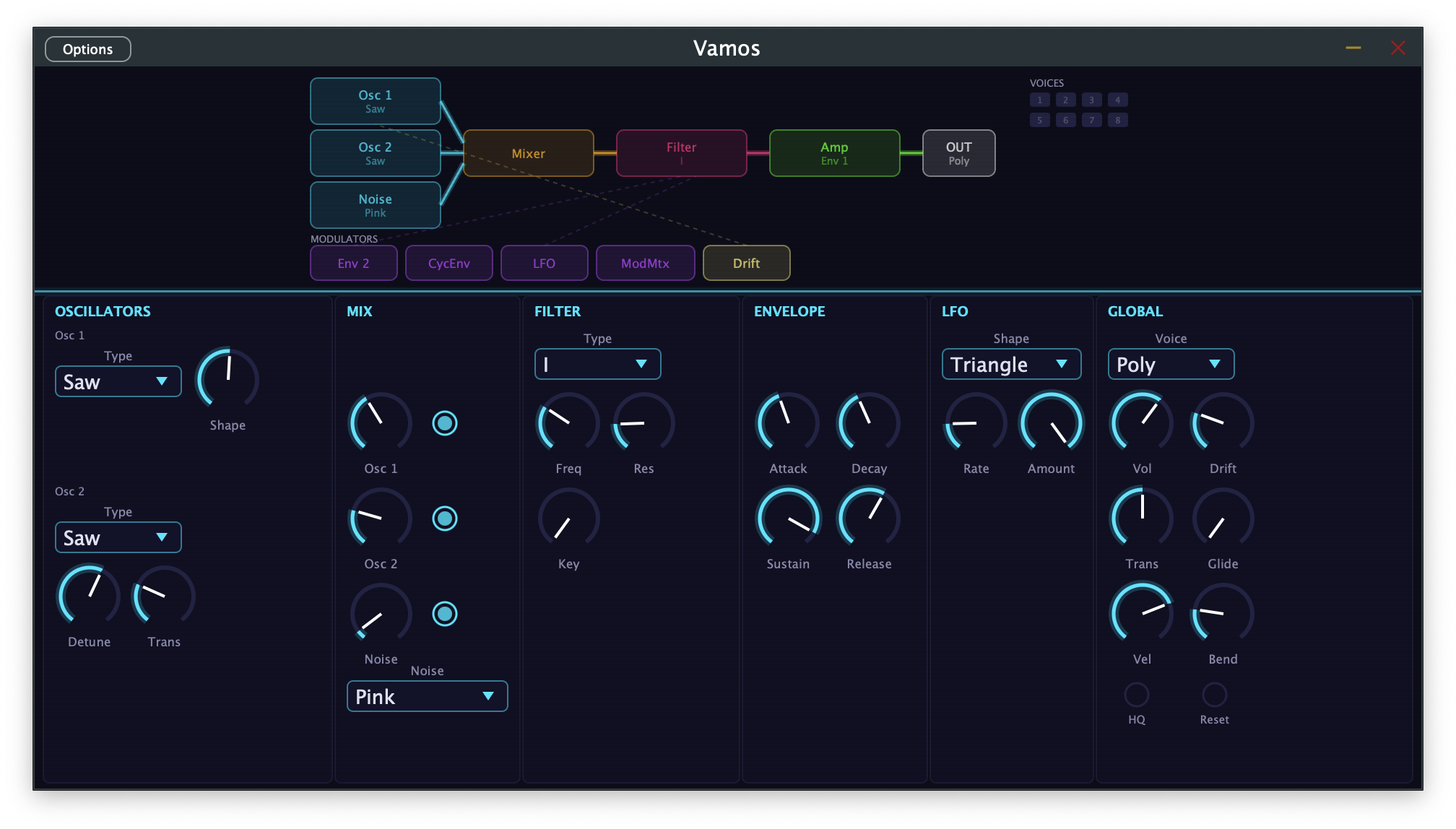
Vamos is two things at once. On one hand, it's a polyphonic synthesizer plugin — eight voices, dual oscillators, eight filter types, a modulation matrix — written in C++20 with JUCE using Claude Code. On the other, it's an experiment in regaining control over what the AI has written, by building animated video explainers in lockstep with the code.

Here's the first episode — a 8-minute walkthrough of Phase 1, from an empty project to a working eight-voice polyphonic synth:
Most of the synth code was written in collaboration with Claude. Within a few days, I was already struggling to remember the specifics of how the filter architecture worked, or why the envelope overshoots to 1.2 before settling. The code was clean. The tests passed. But somewhere between the third and fourth coding session, I'd lost the plot.
Researcher Margaret-Anne Storey describes this phenomenon as "cognitive debt" — not shortcuts in the code, but gaps in human understanding. She observed student teams becoming paralyzed by weeks seven and eight, not because their code was broken, but because no one could hold a complete mental model anymore. We're all living a version of this now. Agentic coding tools generate code at a pace that wasn't possible before. The code is fine. The problem is that we can't keep up.
The usual answer is documentation. But nobody writes enough of it, and what gets written tends to go stale the moment the code changes. So instead of more docs, the Vamos experiment tries something different: the same code-driven approach that builds the synth also builds narrated video walkthroughs that explain it.
How the synth and videos feed each other
The synth gives the videos something real to explain — actual DSP code that runs in a DAW, not a toy example. The phase documents in docs/ capture the architectural thinking behind each step, and that thinking becomes the backbone of each episode's narration.
The videos force clarity back into the code. If you can't explain a design decision in plain language — why the envelope overshoots to 1.2, why PolyBLEP costs only two multiplications per sample, why the DSP layer has zero JUCE dependencies — it's probably not clean enough yet. The act of producing the episode becomes a review of the code itself.

The video pipeline
The videos are built with Remotion, a framework for creating videos using React components instead of timeline editors. Each visual element — code blocks, waveform visualizers, architecture diagrams — is a component that animates based on frame count.
Narration drives the timing. Each scene has narration segments, and the visuals are timed to match:
export type NarrationSegment = {
id: string;
text: string;
/** Frame offset within the scene where this
* segment's audio should start */
startFrame: number;
};
The narration text goes to ElevenLabs for text-to-speech. The resulting audio durations determine how long each visual section lasts — each new segment starts after the previous one's audio ends, plus a one-second gap for breathing room. The pipeline is:
narration.ts → ElevenLabs TTS → timing.ts → Remotion scenes → MP4
↓
VTT subtitles, chapters, thumbnail
Scenes are plain React components using Remotion's animation primitives:
export const Oscillator: React.FC = () => {
const frame = useCurrentFrame();
const { fps } = useVideoConfig();
const titleOpacity = interpolate(
frame, [0, 30], [0, 1],
{ extrapolateRight: "clamp" }
);
return (
<SceneContainer sceneIndex={3}>
<Sequence premountFor={30}>
<SceneNarration narration={NARRATION} />
<WaveformVisualizer type="sawtooth" />
<CodeBlock code={polyBlepSnippet} />
</Sequence>
</SceneContainer>
);
};
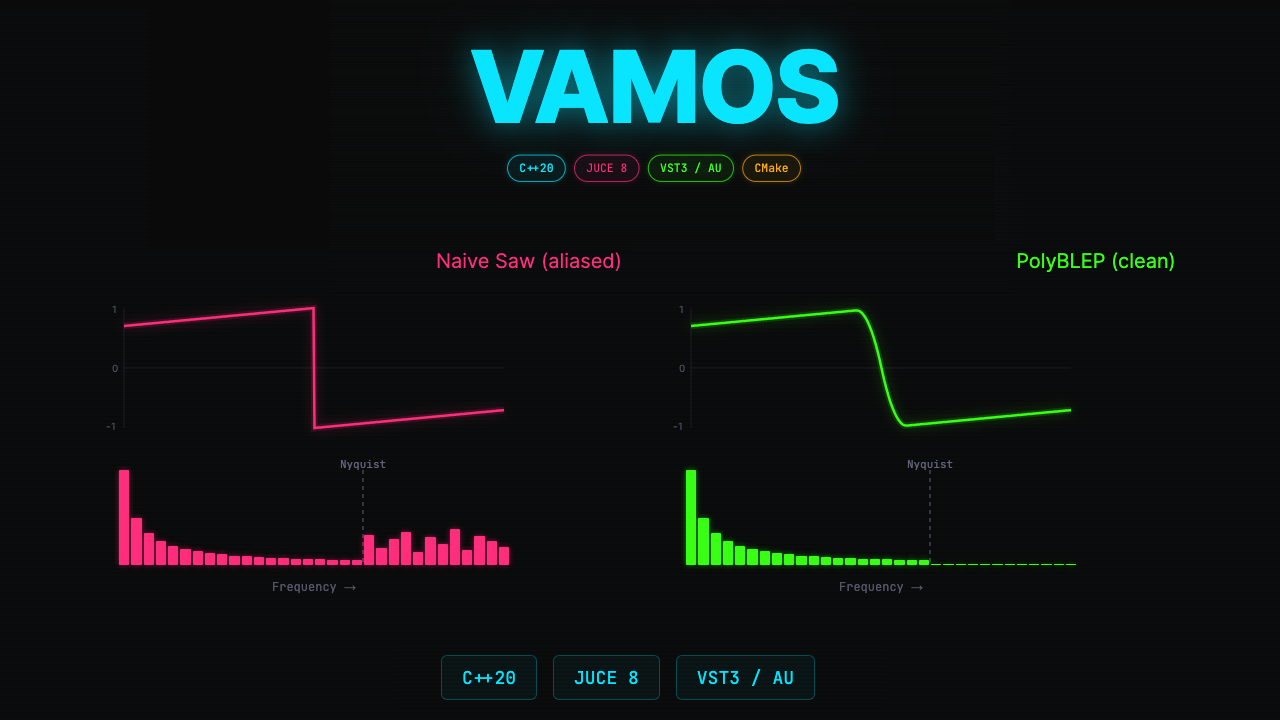
The component library includes domain-specific visualizations. Here's the PolyBLEP anti-aliasing comparison — a naive sawtooth waveform with its spectrum analysis revealing aliasing, right next to the code that fixes it:

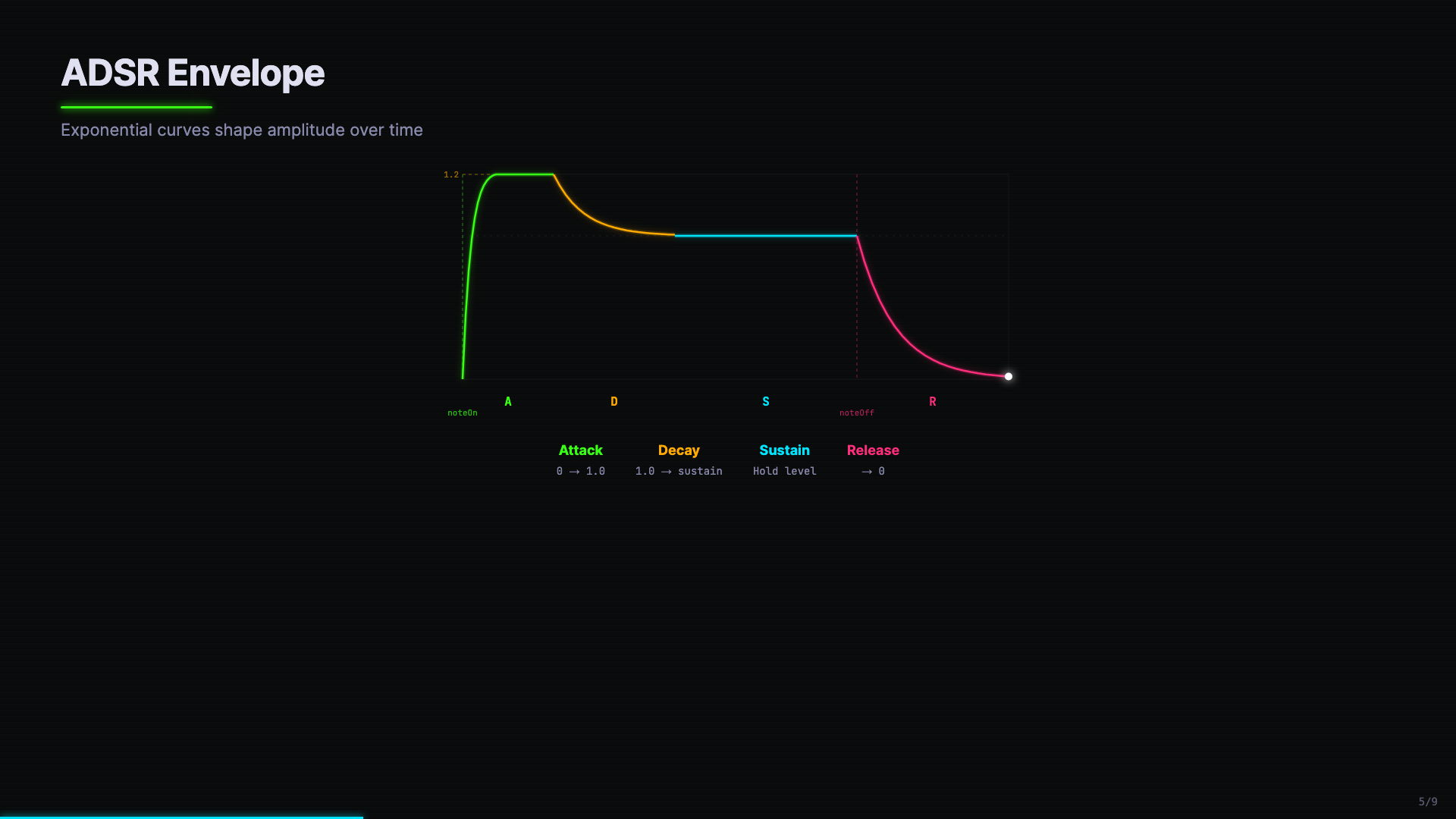
And the ADSR envelope visualization, color-coded by phase (green for attack, amber for decay, cyan for sustain, pink for release), with the overshoot line at 1.2 clearly marked:

Why video, not docs
I like reading documentation for reference, as a way to understand a program as a user. As a developer, my documentation has always been the code I wrote. But now, increasingly, the AI wrote it. And that's the difference — since I no longer wrote the code, I don't have any recollection of it. I need a compressed version, a narrative that pays back the cognitive debt. That's where video comes in.
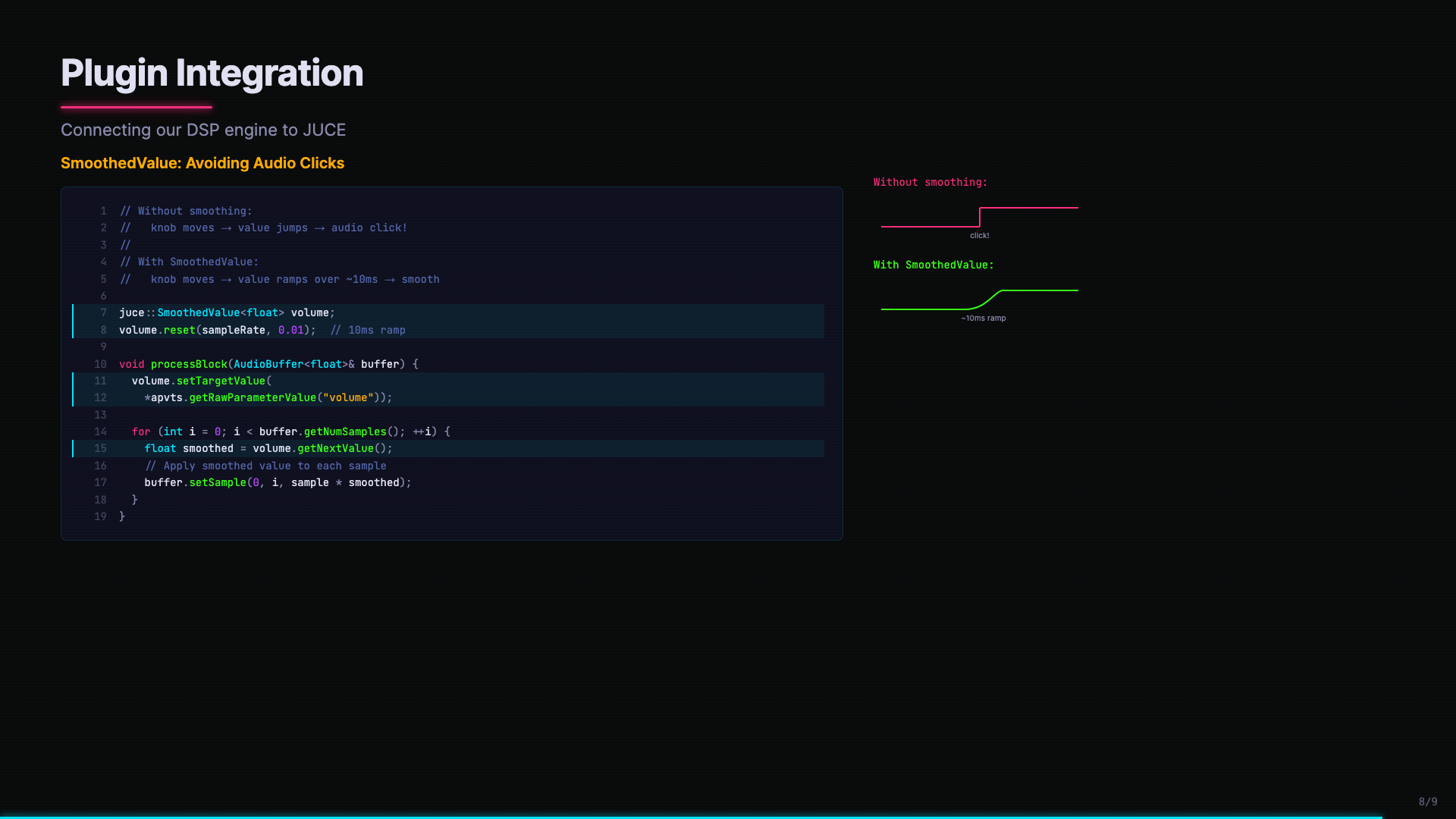
The combination of code, visuals, and narration creates a multi-channel explanation. When the SmoothedValue code appears alongside a before/after waveform comparison — the click artifact versus the smooth ramp — you see why it matters, not just read about it:

There's also a practical angle. You can watch a video overview at 2x speed while making dinner and still absorb the architecture. That's harder to do with a design document.
What we haven't figured out yet
This has already proven very useful in understanding one product, but it isn't a polished product yet; think of it as an idea, a "prompt request" rather than a pull request.
Right now, you still need to tweak the narration scripts that Claude generates, instilling them with human editing for tone and pacing. However, just as with your CLAUDE.md, a NARRATIVE_STYLE.md can help in shaping that narrative for your particular style of storytelling. The visual components need design work for each new domain (a web app's video needs different components than a synth plugin's). Claude can do this, but needs to be nudged not to take the lazy path. Also, rendering takes time: Remotion produces beautiful output, but a 10-minute video takes a while to render.
The scaffolding is there, though. The narration-driven timing system works. The component library grows with each episode. And the pattern is replicable: narration segments → TTS audio → frame calculations → animated React components → rendered video.

Where this could go
I see three levels of video overview worth exploring:
"In the weeds" — PR-level explanations. You open a pull request, and a two-minute narrated video walks the reviewer through the changes, highlighting the important diffs and explaining the reasoning.
"Diving back in" — You took a vacation, or switched to another project for two weeks. You hit a button, and a just-in-time video catches you up on what happened while you were away.
"Archaeology" — Historical deep dives. How did the filter architecture evolve from a simple lowpass to eight filter types? Why does the envelope overshoot? These videos capture the reasoning behind decisions — the part that's hardest to recover from code alone.
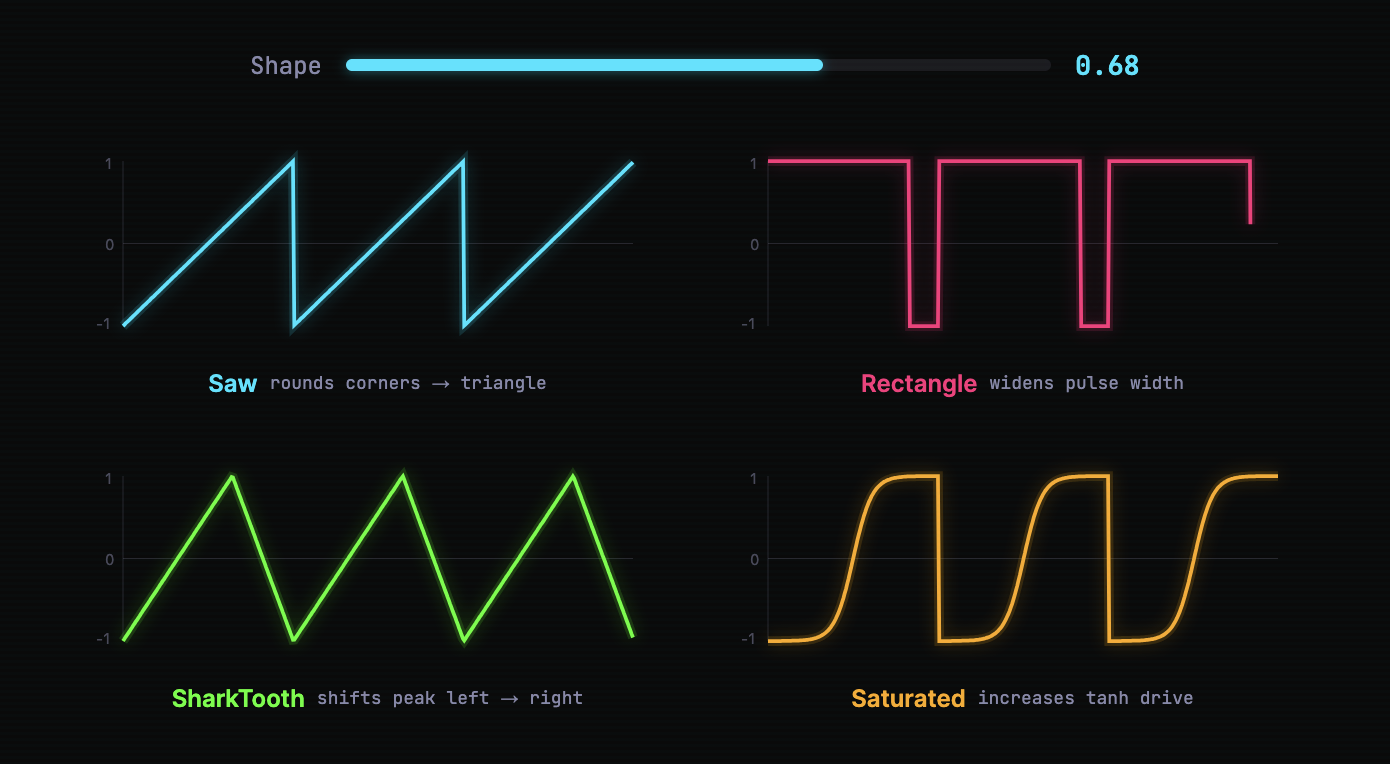
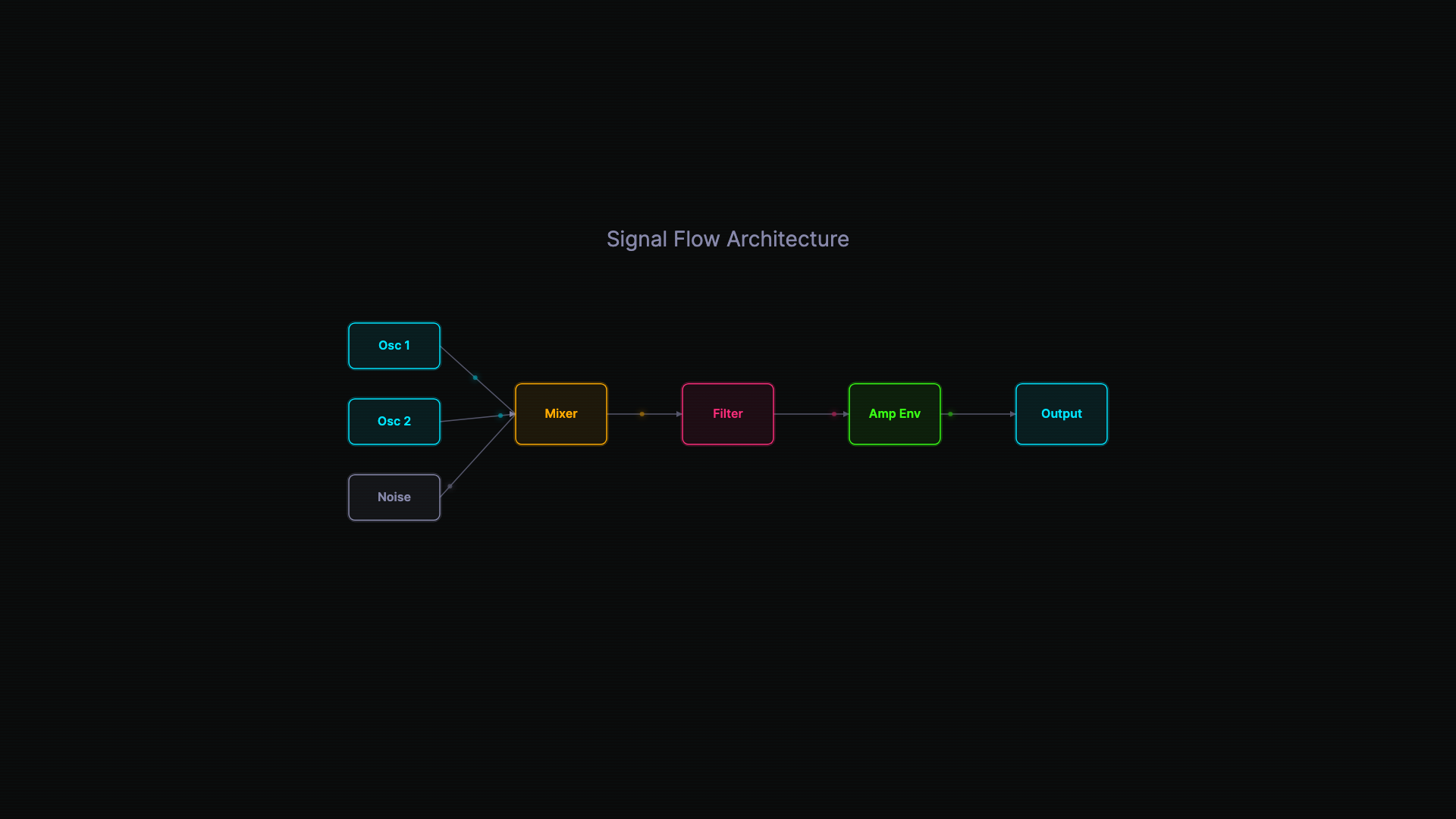
The Remotion component library would grow over time — CodeBlock, WaveformVisualizer, SpectrumVisualizer, ADSRVisualizer, SignalFlowDiagram are just the starting set for audio projects. A web project might add APIFlowDiagram, ComponentTree, StateChart. Each domain builds its own visual vocabulary.
Keeping the theory of the system
Margaret-Anne Storey's research shows that what differentiates effective teams isn't the quality of their code — it's whether the humans maintain a shared "theory of the system." They know not just what the code does, but why it's shaped the way it is.
Video overviews won't eliminate cognitive debt. But they're a way to rebuild shared understanding at a higher bandwidth than reading code line by line. When AI agents are writing hundreds of lines per session, we need tools that help humans keep up — not at the code level, but at the comprehension level.
The code is easy. Understanding is the hard part.